Bid steel faster.
Win more of it.
A desktop estimating platform built by a working estimator, not a software company. Complete takeoff, connection and weld labor, CNC, finishes, and delivery, all driven by one recalc engine. Then close the loop with win-probability pricing from your own bid history. And now the drawings do the typing: Auto Takeoff reads the PDF set for you.
Drawings in. Takeoff out.
Open the structural PDF set and Auto Takeoff reads it for you: beams, columns, and braces found on the plans with their sizes and lengths, schedules and plotted-text callouts read automatically, every member drawn right on the sheet where you can check it. It runs at 99% accuracy against hand takeoffs of real drawing sets, and one click sends the reviewed takeoff into the estimate through the same routing as a Bluebeam import. Structural steel only: misc metals, railings, stairs, and ladders stay with their own calculators, where piece-by-piece pricing belongs.
Open the PDF set
Point it at the structural sheets. Framing plans, column schedules, and braced-frame elevations all get read, including drawings plotted in CAD fonts, which it reads with OCR.
Review on the drawing
Every member it found is drawn on the sheet with its size and measured length, with a confidence flag and the callout it was found by. Click a line in the list, see it on the plan. Fix anything in seconds.
Send to the estimate
One click routes the reviewed members into the estimate by item code, same as a Bluebeam import, so labor, connections, and finish price from it immediately. Or export to Excel and Bluebeam markups.
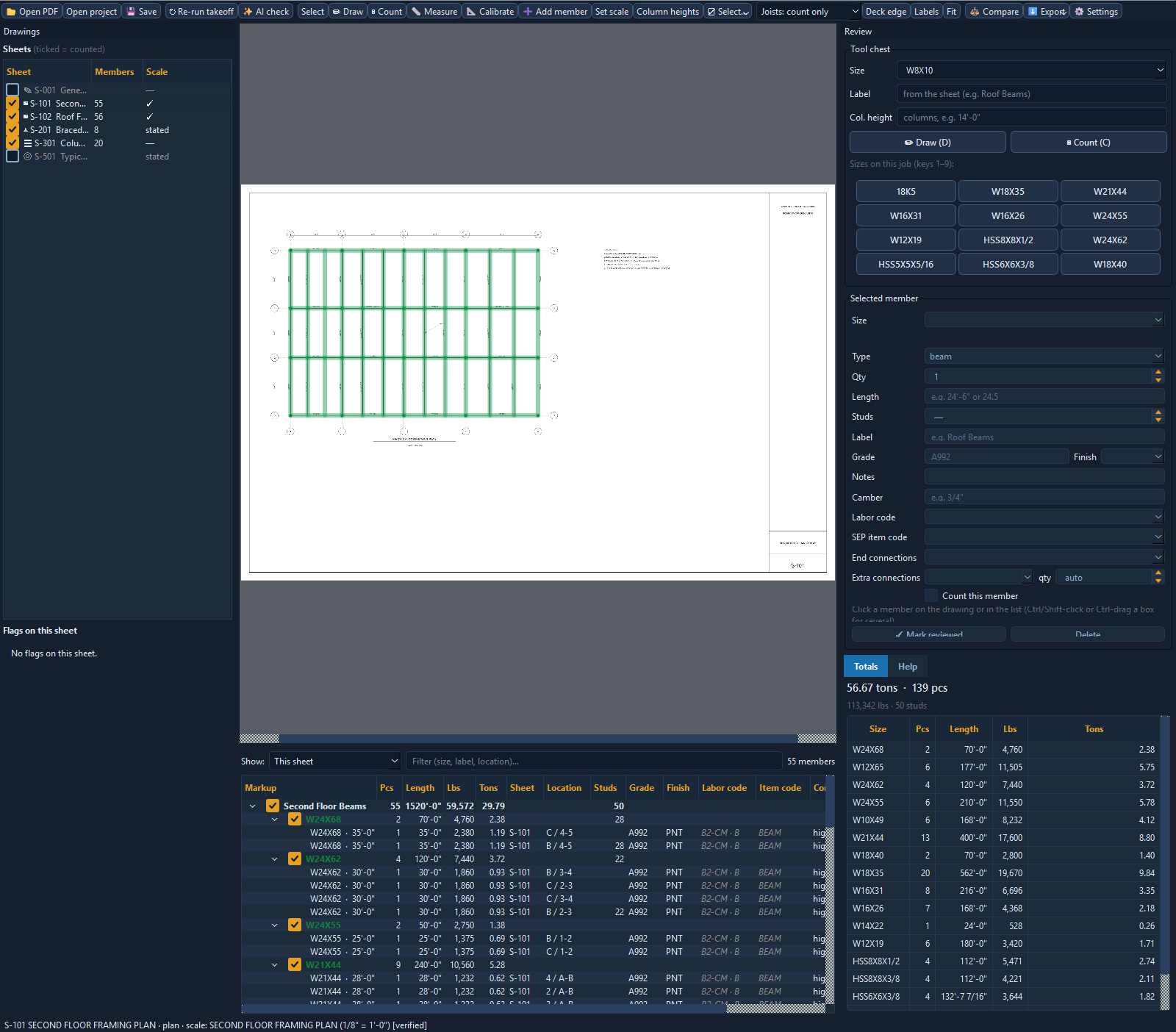
The floor framing plan, read: beams and columns marked on the sheet, the member list with sizes, lengths, weights, and the callout each one was found by, and running totals by size.
The whole estimate lives in one place
No juggling twelve spreadsheets. Material, labor, connections, coatings, and logistics all feed a single recalc engine. Change one number and the entire bid re-prices instantly.
Auto Takeoff from drawings
Open the structural PDF set and the beams, columns, and braces come back with sizes and lengths, marked on the sheet for review at 99% accuracy. Structural steel only; misc metals and rails keep their calculators. One click sends it to the estimate.
Structural takeoff
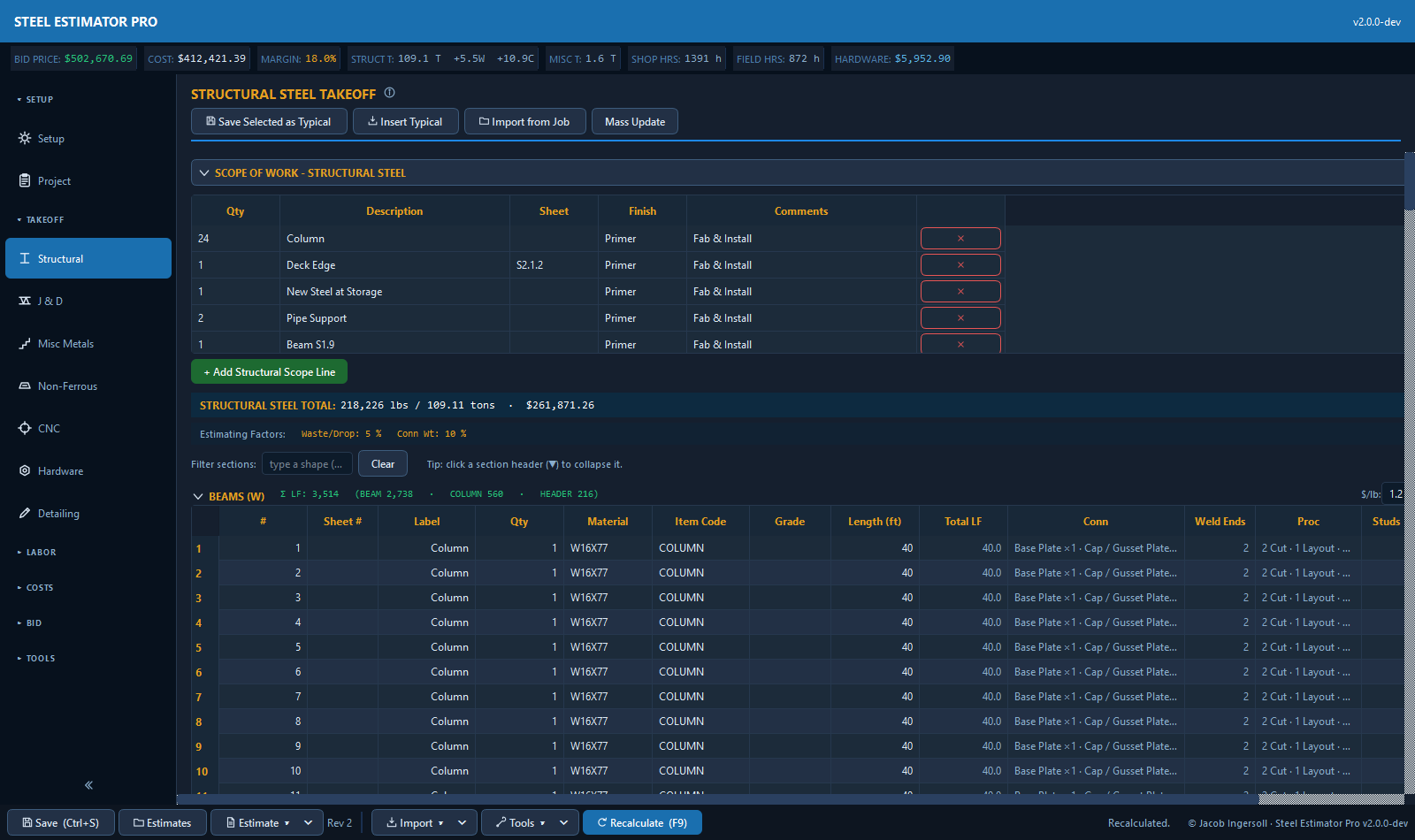
Fast grid-based entry driven by item codes, with collapsible grouping by grid line, scope, or sequence. Weights and costs roll up automatically.
Joist & Deck
Dedicated J&D takeoff with RTU openings and joist-reinforcement calc lines handled as first-class line items, not bolted-on notes.
Misc metals calculators
Parametric dialogs for rails, embeds, ladders, wall-mount handrail and more. Pick material and size, get weight and labor, then reopen and edit any time.
CNC processing
Waterjet, plasma, laser, and press brake in one tab, priced by the operation so cut, pierce, and bend time land where they belong on the sheet.
Weld & connections
Labor by operation: fit-up and weld hours flow to shop labor; consumables and connection bolts drop onto their own cost lines. Estimate the work, not a guess.
Labor priced the way you work
Shop labor builds from operations (cut, drill, cope, fit, weld, clean, handle) and field labor prices by scope label, with tier grids still there for legacy estimates. Carbon and non-ferrous each carry their own rates.
Finish, delivery & field
Coatings, freight, field labor, and equipment each get their own tab so the erected-and-delivered number is real, not a percentage add-on.
Demolition scope
Taking existing steel down gets its own tab: quantity times hours per item at your field rates, its own cost line and pay item, and demo scope lines the proposal prints last.
Bluebeam, BOM, IFC, DXF & DSTV import
Pull takeoff straight from a Bluebeam markup export, a detailer BOM, an IFC model, DXF part files, or DSTV (.nc1) CNC files. Rows route to the right item codes and expand into the estimate in seconds.
Cost Sheet & Proposal
One consolidated cost sheet with markups, then a clean proposal ready to send. No re-keying, no copy-paste between documents.
Real screens, not mock-ups
This is the actual desktop app: a left-hand workflow from takeoff to proposal, every tab feeding one recalc engine. Click through a few of them.
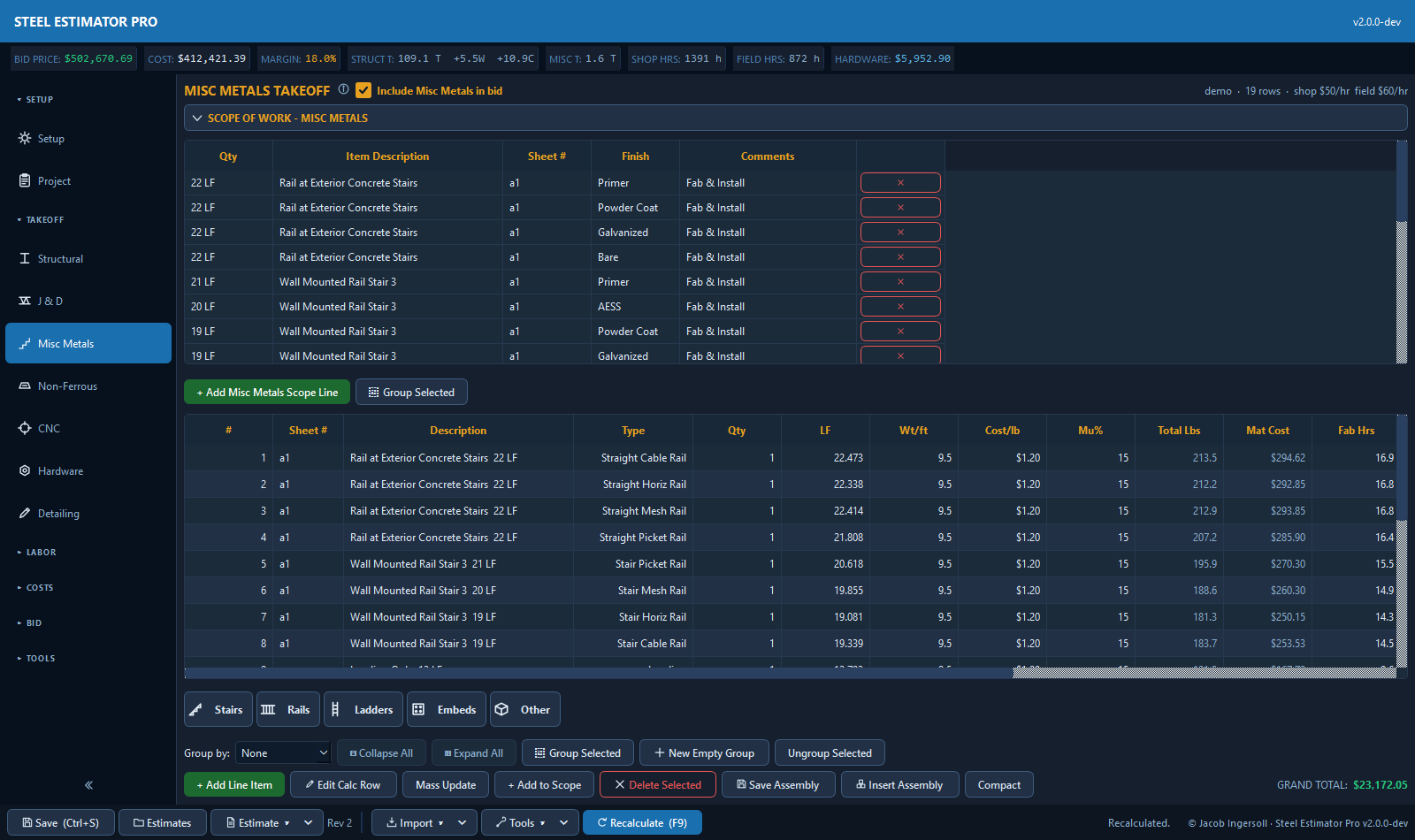
Misc metals takeoff: parametric calculators grouped by category (stairs, rails, ladders, embeds) price each item by the piece, with a scope-of-work panel that flows straight to the proposal.
The whole job on one cost sheet
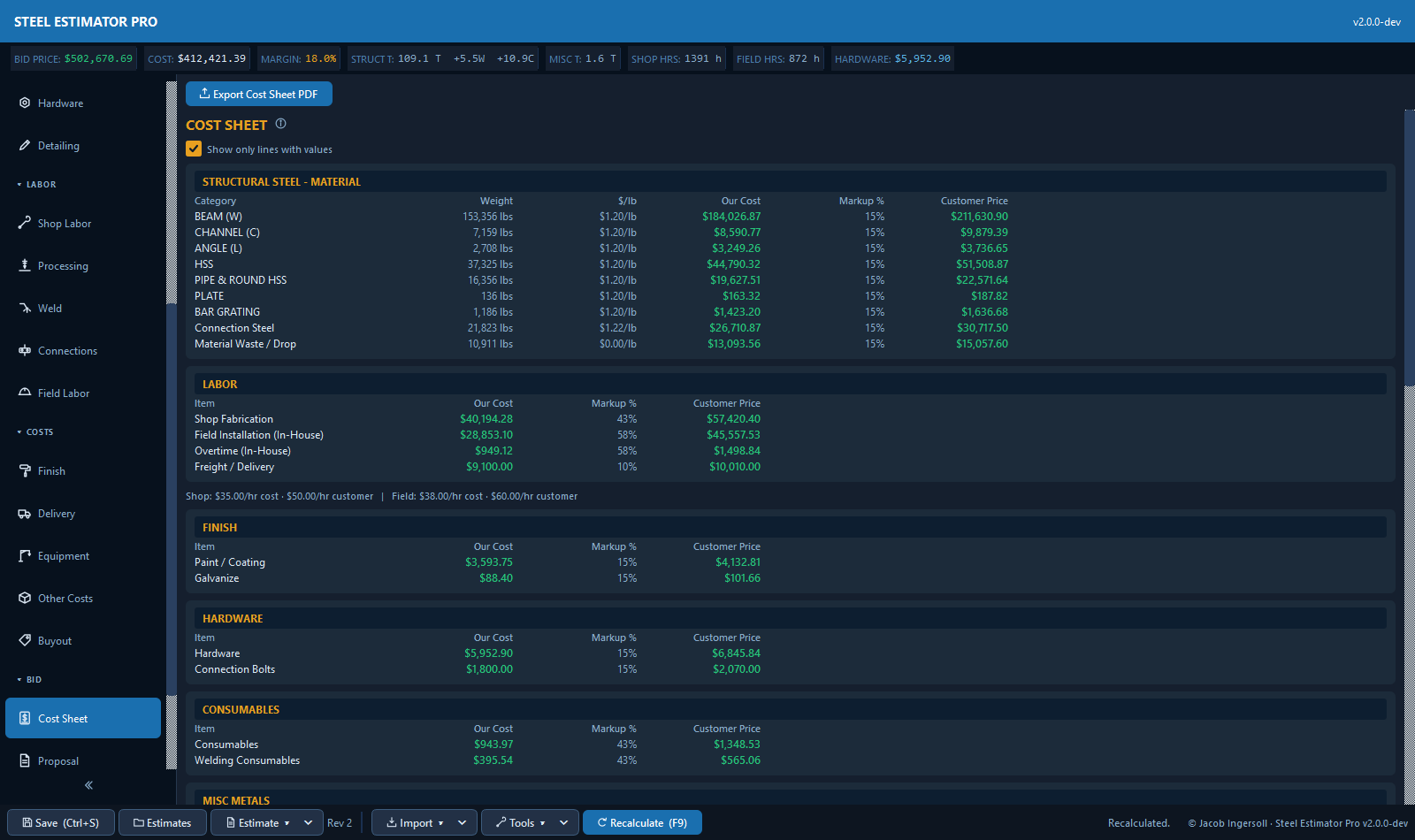
Material, fabrication, finish, CNC and misc metals all roll into a single sheet: Our Cost beside Customer Price with markups, then the profit split and price per pound. This is the number you send.
One click from estimate to AIA-style pay application
Win the job and the estimate keeps working. A schedule of values builds itself from the takeoff, and Progress Billing generates a complete G702 and G703 pay application in Excel with one click: scheduled values, work completed this period, totals, percent complete, balance to finish, and retainage, all computed for you.
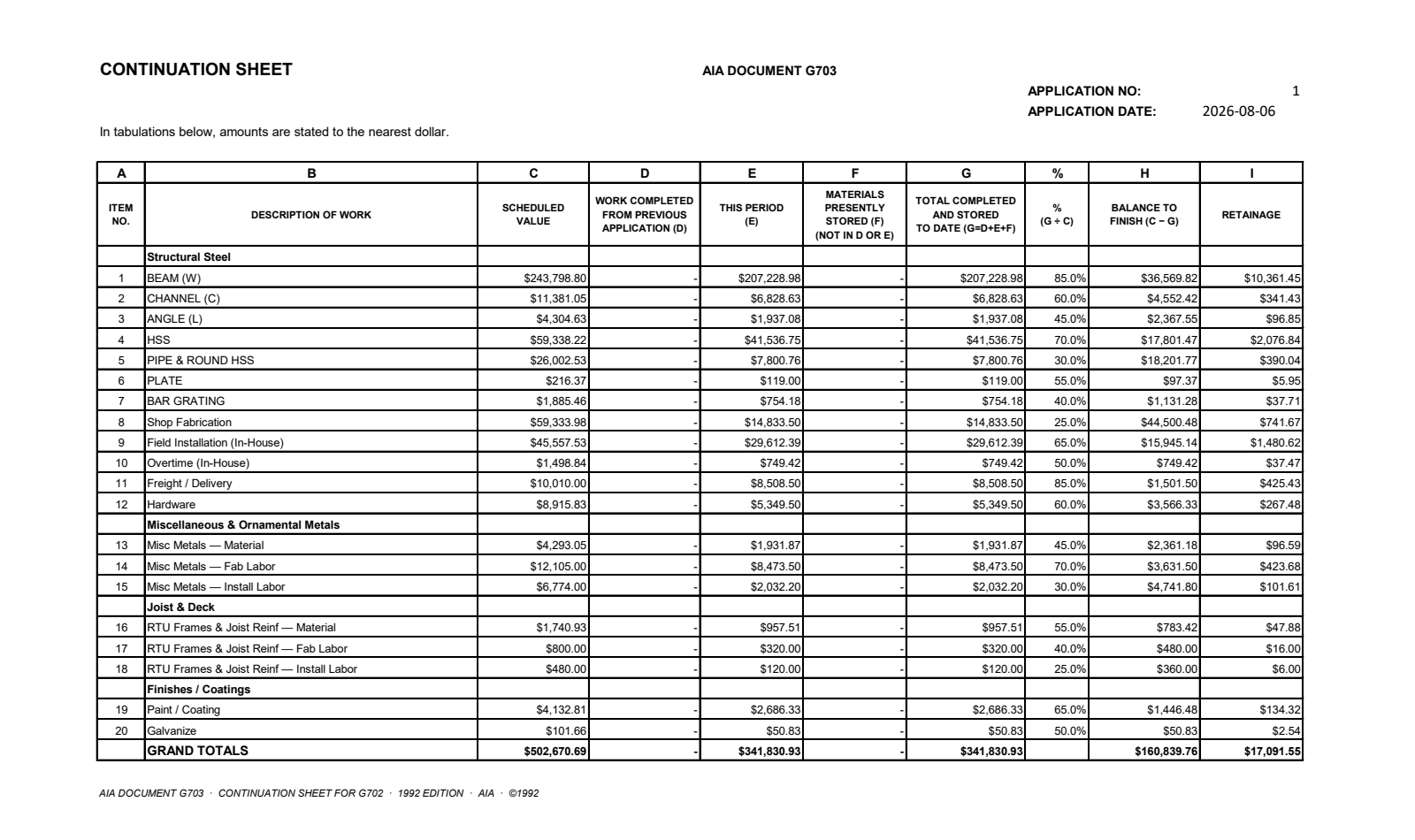
A real export: every schedule line carries its scheduled value, this period's work, total completed, percent, balance to finish, and retainage, with the grand totals your GC's accountant expects.
Price to Win, from your own history
Steel Estimator Pro learns from the bids you've already sent. It reads your hit rate against margin and tells you the price where you actually win, so you stop leaving money on the table on the jobs you'd land anyway, and stop chasing the ones you never will.
- Win-probability curve built from your bid outcomes, not an industry average.
- The lever is margin %. See how each point of margin moves your odds.
- Suggested price-to-win right on the estimate, next to your real cost.
Shop labor by operation
Change one number, re-price the whole bid
Every tab feeds a single centralized recalc engine. Bump a material rate, add a weld pass, up a rail quantity: labor, connections, coatings, and the proposal all move together. No stale totals hiding in a tab you forgot to refresh.
- Consistent math across every estimate: the cost sheet is the single source of truth.
- Per-estimate labor mode: tier grids, operations, or by scope label, your call, job by job.
- Built and regression-tested against real projects, so the number you trust stays the number.
More tools working under the hood
Send Bid with follow-up tracking
Email the proposal from inside the app, then let the follow-up ladder keep the bid alive. Submitted bids arm their own reminders so quotes stop dying in someone's inbox.
Bid Desk analytics
Bid Review, Bid Strategy, Price to Win, Estimate vs Actual, and job rollups in one tabbed window. Sanity-check a bid against your own history before it goes out.
Revision history with restore
Every save can record a revision. See what changed between rev 2 and rev 3, and roll back when an addendum pushes the number the wrong way.
Material nesting and yield
Linear nesting lays takeoff lengths onto mill sticks by shape and material, and plate nesting puts parts on stock sheets with a CNC handoff. Waste becomes a number, not a guess.
Reusable assemblies
Save a typical stair, gate, or connection package once, then insert it into any estimate with its misc, weld, and connection rows intact.
Mass update
Change size, quantity, length, or unit of measure across many rows at once, with a mandatory preview so you see every change before it lands.
Estimate locking
Submitted bids lock behind the estimator's password and Won jobs behind an admin password, so a certified number can't drift after it leaves the building.
Estimate vs actual feedback
Close out a job and feed the real hours back in. The labor standards calibrate themselves from your shop's history, so every estimate gets a little sharper.
Built for a shared shop drive
Multiple seats work the same estimates folder at once. Merge-on-write and file locking keep four estimators from stepping on each other's saves.
3D piece detailing
Open any structural row as a rendered 3D member: holes, copes, and end connections drawn on the actual section. Edit a hole pattern in the detailer and the drill count re-prices the estimate live.
Job tracking after award
Won the bid? The same estimate tracks submittals, ship dates, and fabrication progress, so the handoff from estimating to the shop doesn't start from a blank page.
Clarifications and addenda log
Row notes and assumptions roll into a clarifications log that prints with the proposal, and addenda get tracked by number, so what your price includes is never a memory exercise.
Four steps to a defensible bid
Take off
Import from Bluebeam or a BOM, or key the grids directly. Item codes route everything to the right place.
Add the work
Connections, welds, CNC, finish, delivery, and field labor, each on its own tab, priced by the operation.
Recalc
One engine rolls it all into a cost sheet with your markups. Every number ties out.
Price to win
Check the win-probability curve, set your margin, and send a clean proposal at the number that lands the job.
Made by an estimator, for estimators
Steel Estimator Pro isn't a generic construction package with a steel skin. It's the tool a working structural-steel estimator built to run real bids. Every tab, every item code, and every calculation exists because a real job needed it. That's why it fits the way steel actually gets estimated.
Steel estimating & takeoff software FAQ
What is Steel Estimator Pro?
Steel Estimator Pro is estimating and takeoff software for structural steel fabricators. It handles material takeoff, shop and field labor, connections, welding, CNC processing, misc metals, finishes and delivery, then rolls everything into a cost sheet and proposal.
Does it do structural steel takeoff?
Yes. Structural steel takeoff is grid-based and driven by item codes, with collapsible grouping and automatic weight and cost roll-ups. You can also import a takeoff from a Bluebeam markup export or a detailer BOM / advance bill.
Can it do an automatic takeoff from PDF drawings?
Yes, for structural steel. Auto Takeoff reads the structural PDF set and finds beams, columns, and braces with their sizes and lengths at 99% accuracy against hand takeoffs, reading schedules and plotted-text callouts automatically. Every member is marked on the drawing so you can review and correct before sending the takeoff into the estimate, or exporting it to Excel and Bluebeam markups. It does not take off misc metals: railings, stairs, ladders, and embeds are priced through their own calculators.
Can it estimate misc metals like handrails, stairs, and ladders?
Yes. Misc metals have dedicated parametric calculators: pipe, HSS and flat-bar rails, wall-mount handrails, stairs, ladders, embeds, bollards, bar grating and more, each returning weight, fabrication and install labor, and cost.
Is it an alternative to StruMIS or PowerFab?
Steel Estimator Pro focuses on the estimating and bidding side: takeoff, labor, cost sheet, and price-to-win. Shops that want a lighter, estimator-first alternative to StruMIS or PowerFab for putting bids together use it for exactly that. See how it compares as a PowerFab alternative or a StruMIS alternative.
Does it handle connection and weld labor?
Yes. Connections and welds can be estimated by operation: fit-up and weld hours flow into shop labor, while welding consumables and connection bolts land on their own cost lines instead of a rough percentage add-on.
What does the cost sheet include, and what platform does it run on?
The cost sheet breaks the whole job into material, labor, finish, CNC and misc metals, showing Our Cost beside Customer Price with markups, then the profit split, price per pound and price per square foot. Steel Estimator Pro is a Windows desktop application.
What file formats can it import?
Bluebeam markup exports (CSV), detailer BOMs and advance bills (Excel or CSV), IFC building models, DXF part files, and DSTV (.nc1) CNC files. Imported rows route to the right item codes automatically, and an import log tracks everything that came in.
Does it estimate stainless steel and aluminum?
Yes. A dedicated Non-Ferrous tab mirrors the structural workflow for stainless and aluminum, with per-metal pricing and grade-aware weights, so alloy work is priced from real alloy data instead of scaled carbon numbers.
Does it track estimate revisions?
Yes. Every save can record a revision, and the history is one click away with restore, so you can answer "what changed since rev 2" and roll back if a bid moves the wrong way.
See it run on one of your jobs
Bring a real project. We'll take it off, price it, and show you where your win number should be.